AI Doer CLI — User Guide
The AI Doer CLI (aidoer) is a
terminal client for the AI Doer AI agent. It runs the same agent engine
that powers the AI Doer Editor and the VS Code extension — the
difference is that the CLI embeds the engine in-process
(as the mcp_universal Rust crate) and drives it directly,
so there's no local HTTP server to manage.
Scope note. The CLI's own source (argument parsing, terminal rendering) lives in the separate
aidoerrepository. This repo (aidoer-editor) contains the shared engine (agent/) that the CLI vendors asengine/. So everything in this guide about agent behavior, modes, tools, and project configuration is authoritative and identical across all three products; only the exact CLI command flags are defined in the CLI repo and may differ slightly from the examples below.
Engine internals are documented in the source repository.
1. What the CLI is for
The CLI lets you point the AI Doer agent at a project from your terminal and:
- Ask questions about a codebase.
- Have the agent implement features, fix bugs, and refactor across files.
- Run and review shell commands with approval gates.
- Plan work before executing it.
- Review code changes.
Because the engine is embedded in-process, the CLI is a good place to validate agent behavior quickly and to script agent runs.
2. Installing
Install from the aidoer repository/release channel
(see that project's README for the current install command). Once
installed, run it from within (or pointed at) a project directory.
aidoer # start in the current directoryThe CLI is scoped to a single project root (the directory you run it in, or one you pass explicitly). Memory and context are keyed to that root.
3. Authentication & the free tier
- Free tier ("Auto") works out of the box via the
free
qwen-flash-backed model. - API key: set
GETAIBD_API_KEYto use premium models and lift the free-tier limits. The base URL defaults tohttps://ai-doer.com/v1/apiand can be overridden withGETAIBD_BASE_URL.
The CLI uses a login-based trial gate rather than the editor/VS anonymous device fingerprint. Consult the CLI repo for the login flow.
4. Basic usage
Typical patterns (exact flags come from the CLI repo):
# Interactive session in the current project
aidoer

# One-shot prompt
aidoer "explain how authentication works in this repo"

# Point at a specific project
aidoer --project /path/to/repo "add a health check endpoint"
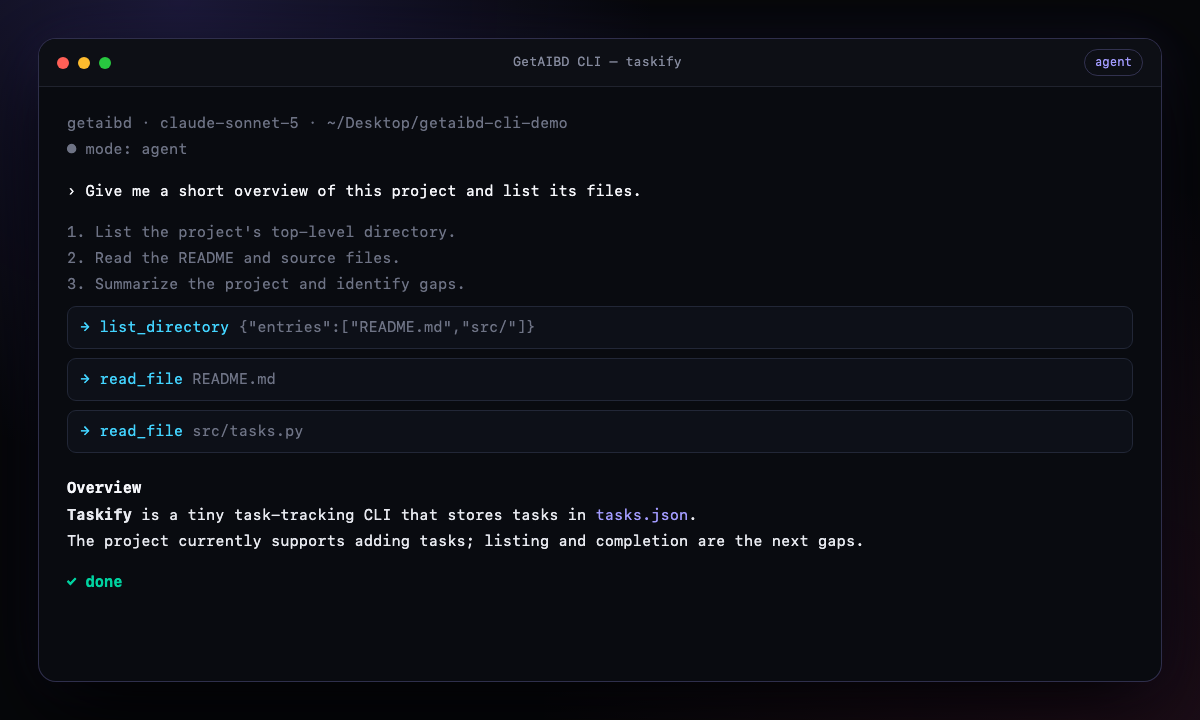
During a run the CLI streams the agent's activity to your terminal:
- Thinking / planning — the model's reasoning.
- Tool calls — e.g. reading a file, searching, running a command.
- Answer text — the model's response, streamed.
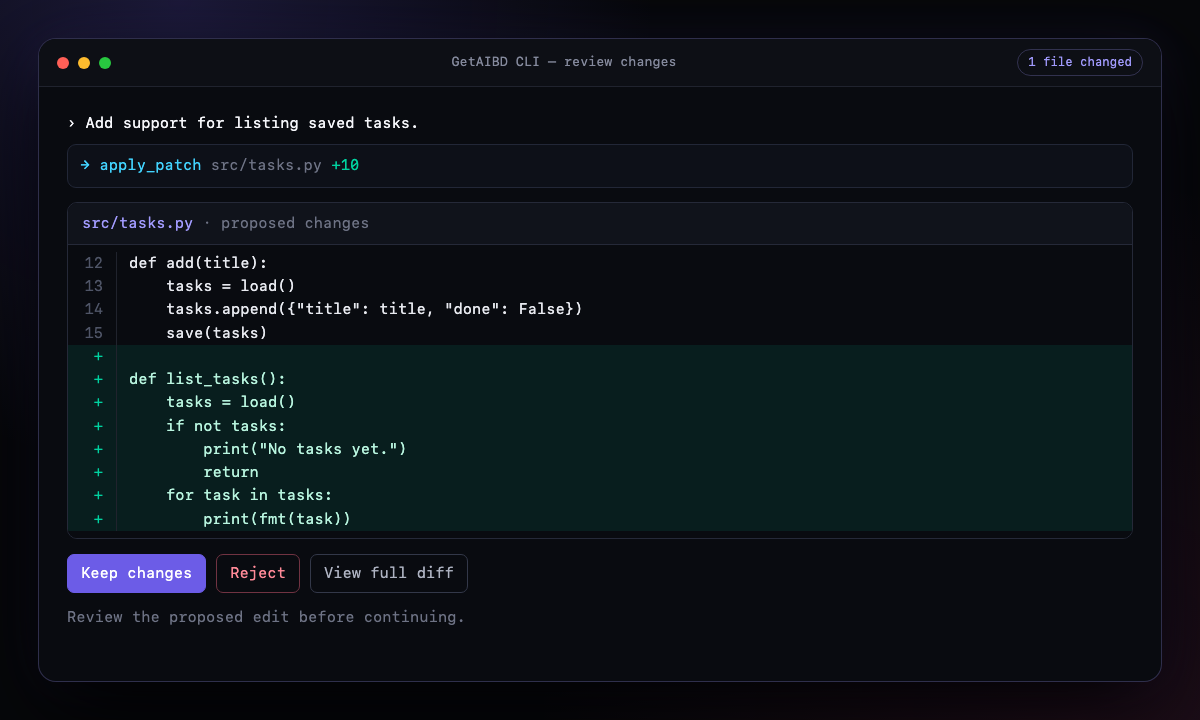
- File edits — a summary of files the agent changed (review/revert per the CLI's UI).
- Completion — when the run finishes.
5. Modes
The agent supports the same modes everywhere. Select the mode appropriate to your task:
| Mode | Purpose | Edits/commands? |
|---|---|---|
| Agent | Full end-to-end task execution. | Yes |
| Plan | Read-only exploration; produces a plan (to a temp markdown file). | No |
| Ask | Answer questions about the code. | No |
| Debug | Systematic troubleshooting with runtime evidence. | Yes |
| Reviewer | Strict read-only code review. | No |
| Auto | Let the orchestrator pick the best mode from your prompt. | Depends |
Each mode has its own system prompt and iteration budget, and Plan/Ask/Reviewer restrict the toolset to read-only operations (plus plan writing in Plan mode).
6. Approvals & command safety
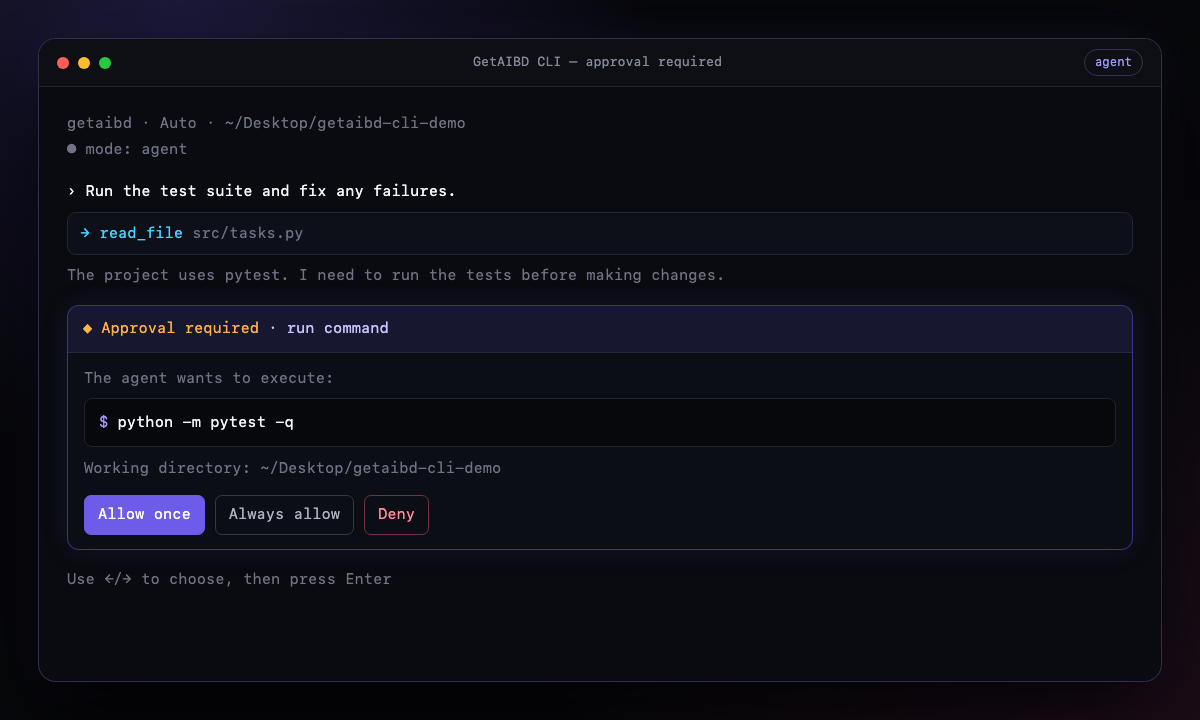
The agent asks before running shell commands and using certain tools. In the CLI these are resolved through in-process approval gates:
- Approve / deny each request, or set a tool to always-allow for the session.
- Dangerous commands (e.g.
sudo,rm,curl,wget,ssh, raw shells) always require explicit approval — even if the tool is otherwise allowed.
You can codify a policy so you're not prompted for routine commands — see permissions.json.
7. What the agent can do (tools)
The agent has a rich toolset (identical across editor/CLI/VS). Highlights:
Files & editing
read_file,write_file,patch_file,list_directory,search_files,move_file,delete_file.
Search & code intelligence
search_code— one search tool that auto-routes between exact (ripgrep), symbol, and semantic search.semantic_search,find_symbol,find_references,document_symbols.explore— a read-only sub-agent that scopes out "where does X live" without cluttering the main run.
Shell & environment
run_command(with background support for long-running/dev-server commands),read_terminal,manage_env.
Git & GitHub
git_status,git_diff(supportsref/base..head),git_log(path/authorfilters),git_show,git_blame,git_branch,git_checkout,git_add,git_commit,git_reset,git_push.github_pr_list,github_pr_create,github_pr_checkout.
Worktrees
worktree_list,worktree_create,worktree_remove(with optional per-project setup commands fromworktrees.json).
Web
web_fetch— fetches any URL and understands GitHub PRs, issues, files, and commits, public or private (prefers a local clone using your SSH creds, falls back to theghCLI /GH_TOKEN).web_search(needs a AI Doer key).
Planning & completion
update_plan,write_plan(Plan mode),attempt_completion.
External tools
- Any MCP servers you configure in
.getaibd/mcp.jsonare exposed as tools.
Large tool outputs (
web_fetch,git_diff,git_show,git_blame) are stashed to.getaibd/tmp/and referenced by path so they don't bloat the conversation context.
8. Project configuration
(.getaibd/)
Drop a .getaibd/ folder in your project (or
~/.getaibd/ for global defaults) to guide the agent. These
files are shared across all AI Doer clients:
The .getaibd directory and GETAIBD_*
environment variables are retained as compatibility identifiers for existing
installations.
AGENTS.md — project
instructions
Free-form markdown rules the agent always reads for this project. Merged with the built-in baseline guidance.
rules/*.md — scoped
rules
Markdown files with front matter (description,
globs, alwaysApply) that apply
conditionally.
permissions.json —
command/tool policy
{
  "mode": "auto-review",
  "allow": ["git status", "cargo *", "read_file"],
  "ask": ["git push*", "*sudo*"],
  "deny": ["rm -rf /*"],
  "protect": { "file_deletion": true, "external_files": true }
}
mode is one of auto-review,
allowlist, or run-everything. Project rules
override global ones.
sandbox.json —
opt-in command sandboxing
{
  "enabled": false,
  "writable_paths": ["~/.cargo"]
}
When enabled, run_command is wrapped in an OS sandbox —
sandbox-exec (macOS Seatbelt) or bwrap (Linux)
— restricting writes to the workspace, /tmp, and your
writable_paths.
worktrees.json —
worktree setup
{
  "setup-worktree": ["npm install"],
  "setup-worktree-unix": ["./setup.sh"],
  "setup-worktree-windows": ["setup.bat"]
}
mcp.json — external
MCP servers
{
  "mcpServers": {
    "my-server": {
      "command": "node",
      "args": ["server.js"],
      "env": { "KEY": "value" }
    }
  }
}
MEMORY.md —
durable project notes
Long-lived facts the agent should remember about the project.
9. Memory & codebase awareness
The agent maintains a per-project index so it can find relevant code:
- On startup it indexes important files and incrementally re-indexes changes (via a Merkle tree over file hashes).
- Retrieval is hybrid (semantic embeddings + keyword search).
- Indexing and memory writes are paused when disk space is low (below ~1 GiB) so a full disk doesn't wedge the engine.
The index lives outside your project (see §12), so it never clutters your working tree.
10. Models & reasoning
- Auto (free) is the default. With
GETAIBD_API_KEYset you can use premium models. - Reasoning-capable models accept a reasoning effort (low / medium / high) for harder problems.
- The pipeline uses a cheaper/faster model for triage, planning, and exploration, reserving your chosen model for the actual work — keeping simple tasks fast and complex ones structured.
11. Environment variables
| Variable | Purpose |
|---|---|
GETAIBD_API_KEY |
API key for premium models / higher limits. |
GETAIBD_BASE_URL |
API base URL (default https://ai-doer.com/v1/api). |
GETAIBD_PIPELINE |
Set to 0/false to disable the multi-agent
pipeline. |
GETAIBD_PIPELINE_MODEL |
Override the cheap model used for triage/plan/explore. |
GETAIBD_MIN_FREE_DISK_MB |
Low-disk threshold (default 1024 MiB). |
GETAIBD_MAX_RUN_TOKENS |
Hard token budget per run (0 = off). |
GETAIBD_MAX_LLM_CALLS |
Hard LLM-call budget per run (0 = off). |
GH_TOKEN |
Used by web_fetch/GitHub tools when SSH isn't
available. |
12. Data & config locations
| Path | What's there |
|---|---|
~/.getaibd/ |
Global state and authored config. |
~/.getaibd/projects/<slug>/ |
Per-project memory DB, MEMORY.md, per-project
config. |
<project>/.getaibd/ |
Project-authored config (AGENTS.md,
rules/, permissions.json,
sandbox.json, worktrees.json,
mcp.json). |
<project>/.getaibd/tmp/ |
Spilled large tool outputs (auto-cleaned hourly / after 24 h). |
The per-project slug is a stable hash of the canonical project root.
13. Troubleshooting
The agent keeps asking to run the same commands. Add
them to allow in .getaibd/permissions.json, or
choose "always allow" when prompted. Dangerous commands always re-prompt
by design.
A private GitHub PR/issue won't fetch.
web_fetch prefers a local clone via your SSH credentials,
then falls back to the gh CLI / GH_TOKEN. Make
sure one of those has access to the repo.
Indexing seems disabled. Free disk space is probably
below the threshold — indexing and memory writes pause until you free
space (or raise GETAIBD_MIN_FREE_DISK_MB).
A long-running command "hangs" the run. Long-running
/ dev-server commands are detached to the background; the run continues.
Inspect output via the CLI's terminal view /
read_terminal.
I want the exact CLI flags. Command-line flags,
subcommands, and the interactive UI are defined in the
aidoer repository; run aidoer --help
for the authoritative list.